Statistics 2nd ed

self-test-quiz

Mixed (Split-Plot) ANOVA
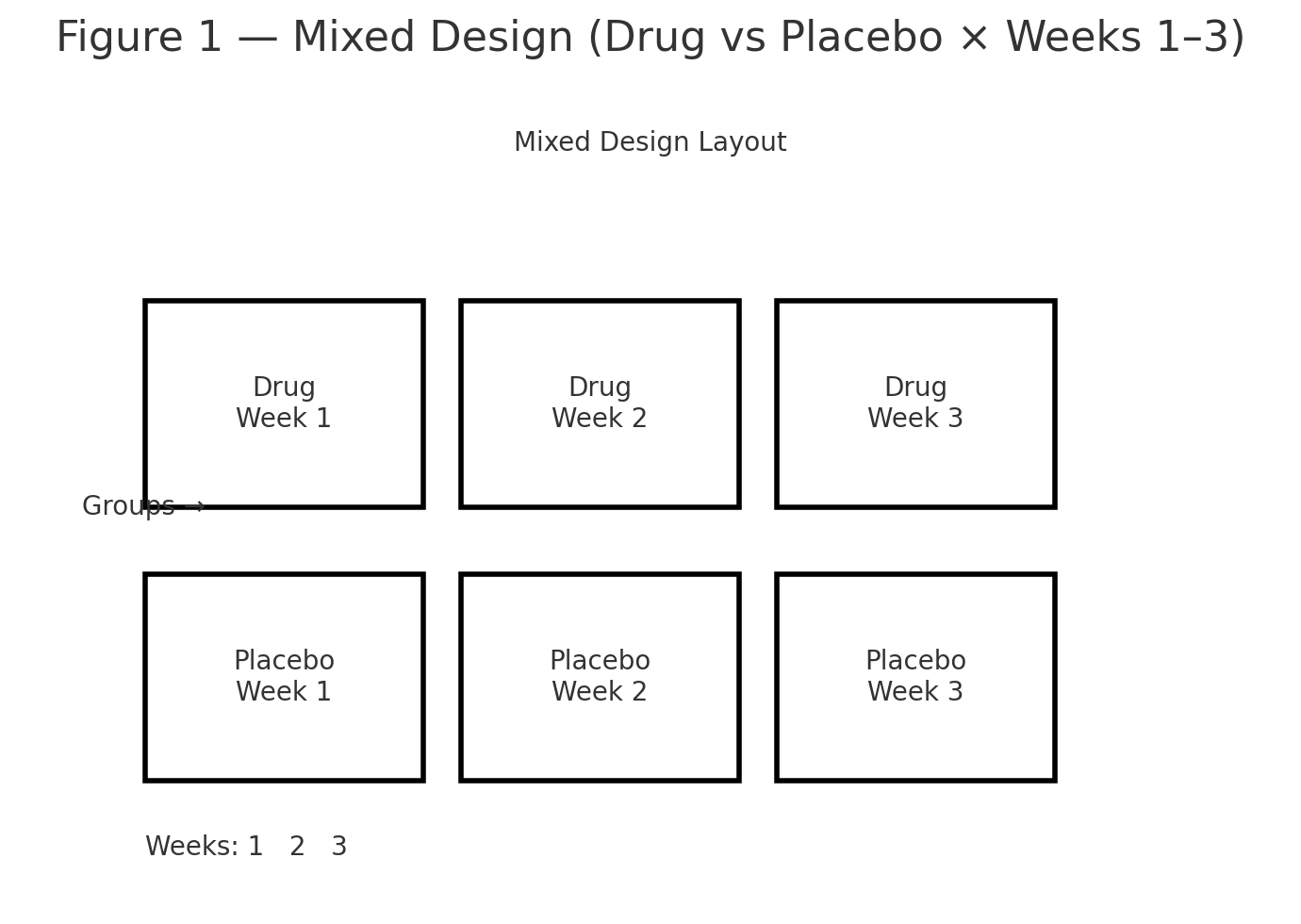
mixed anova layout
mixed anova mean profile
partitioning variance
f distribution
split-plot interaction

Goal. Test a between-subjects factor (Group: Drug vs. Placebo) and a within-subjects factor (Time: Weeks 1–3), plus their interaction, on exam scores.

Design & Experiment

  • Between-subjects factor: Group = {Drug, Placebo}
  • Within-subjects factor: Time = {Week 1, Week 2, Week 3}
  • Balanced: 8 participants per group (\(s_g=8\)), 3 repeated measures per participant (\(k=3\)).

Participants are randomly assigned to Drug or Placebo. The same exam is given at Week 1, Week 2, and Week 3.

Figure 1: Mixed design layout (Drug vs Placebo × Weeks 1–3).


Data

Group: Drug (8 participants × 3 weeks)

SubjectW1W2W3Row sumRow mean
D170747822274.00
D269737721973.00
D371757922575.00
D472768022876.00
D568727621672.00
D670747822274.00
D773778123177.00
D871768022775.67
Column sums564597629Group sum = 1790Group mean \( \bar X_{\text{Drug}} = 1790/24 = 74.5833 \)

Group: Placebo (8 participants × 3 weeks)

SubjectW1W2W3Row sumRow mean
P170717221371.00
P269707121070.00
P371727321672.00
P472737421973.00
P568697020769.00
P670717221371.00
P769707121070.00
P871727321672.00
Column sums560568576Group sum = 1704Group mean \( \bar X_{\text{Plac}} = 1704/24 = 71.0000 \)

Totals. Grand sum = 1790 + 1704 = 3494, total observations \(N = 16\times3 = 48\), grand mean \( \bar X = 3494/48 = 72.7917\).

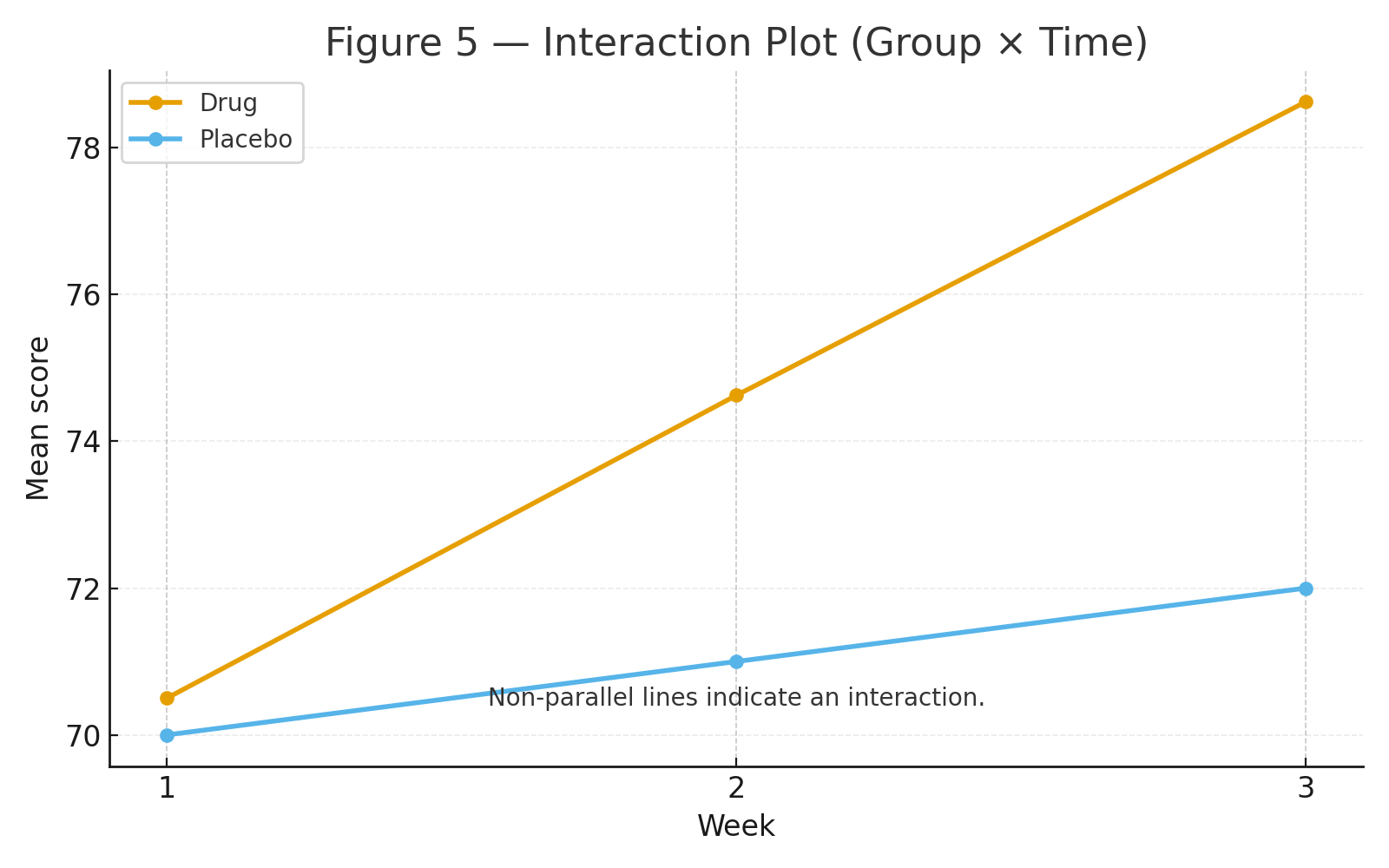
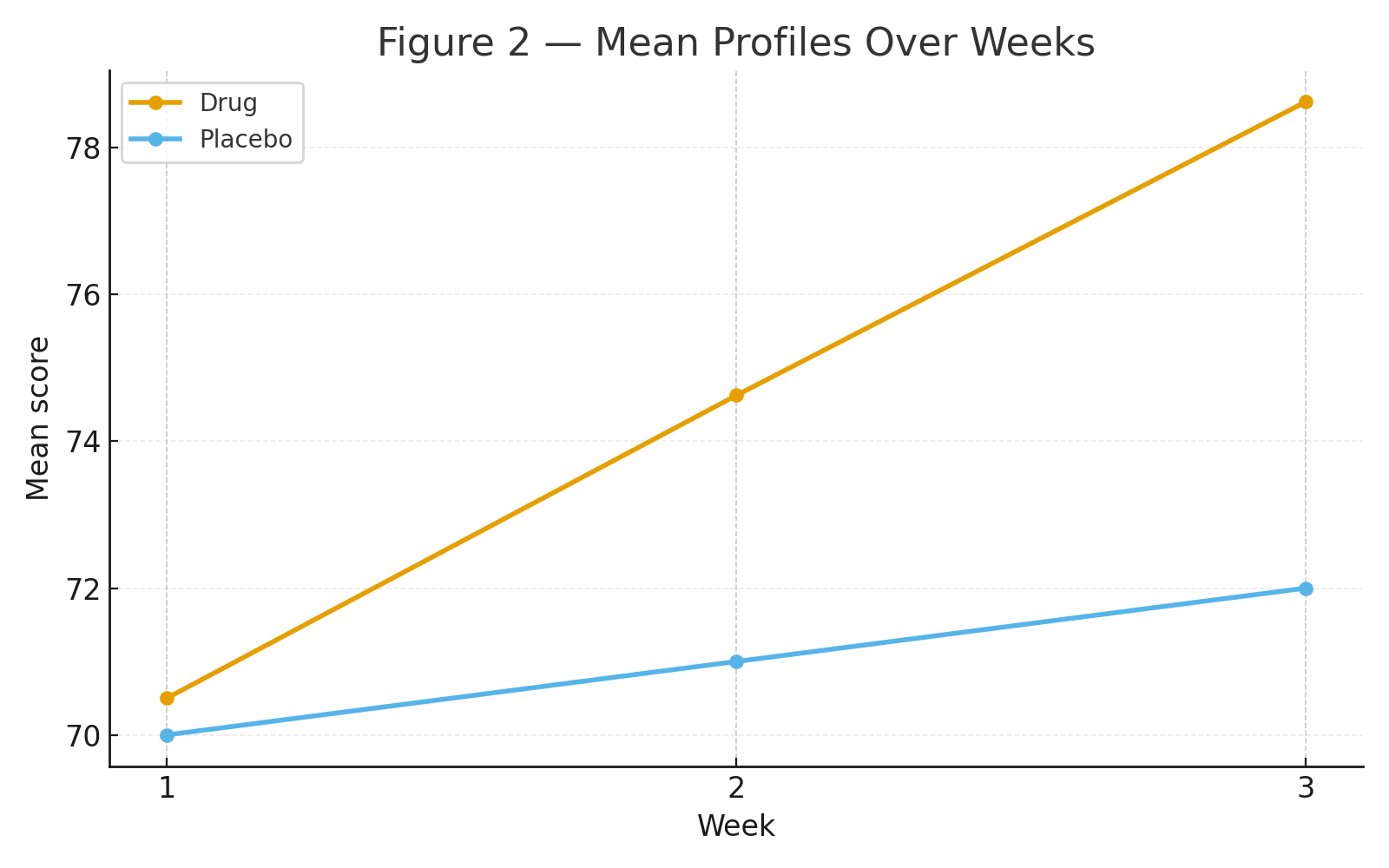
Figure 2: Mean profiles over weeks (Drug rises sharply; Placebo ~ flat).


Step 1 — Marginal Means

By Time (across both groups; 16 participants each week): \[ \bar X_{\text{W1}}=\tfrac{1124}{16}=70.2500,\qquad \bar X_{\text{W2}}=\tfrac{1165}{16}=72.8125,\qquad \bar X_{\text{W3}}=\tfrac{1205}{16}=75.3125, \] where column sums are \(1124, 1165, 1205\).

By Group (across all weeks): \[ \bar X_{\text{Drug}}=74.5833,\qquad \bar X_{\text{Placebo}}=71.0000. \]


Step 2 — Sums of Squares (SS)

Decompose total variability into Between-Subjects and Within-Subjects parts.

2A. Total

\[ SS_{\text{total}}=\sum (X_{igt}-\bar X)^2=\mathbf{527.9167}. \]

2B. Between-Subjects

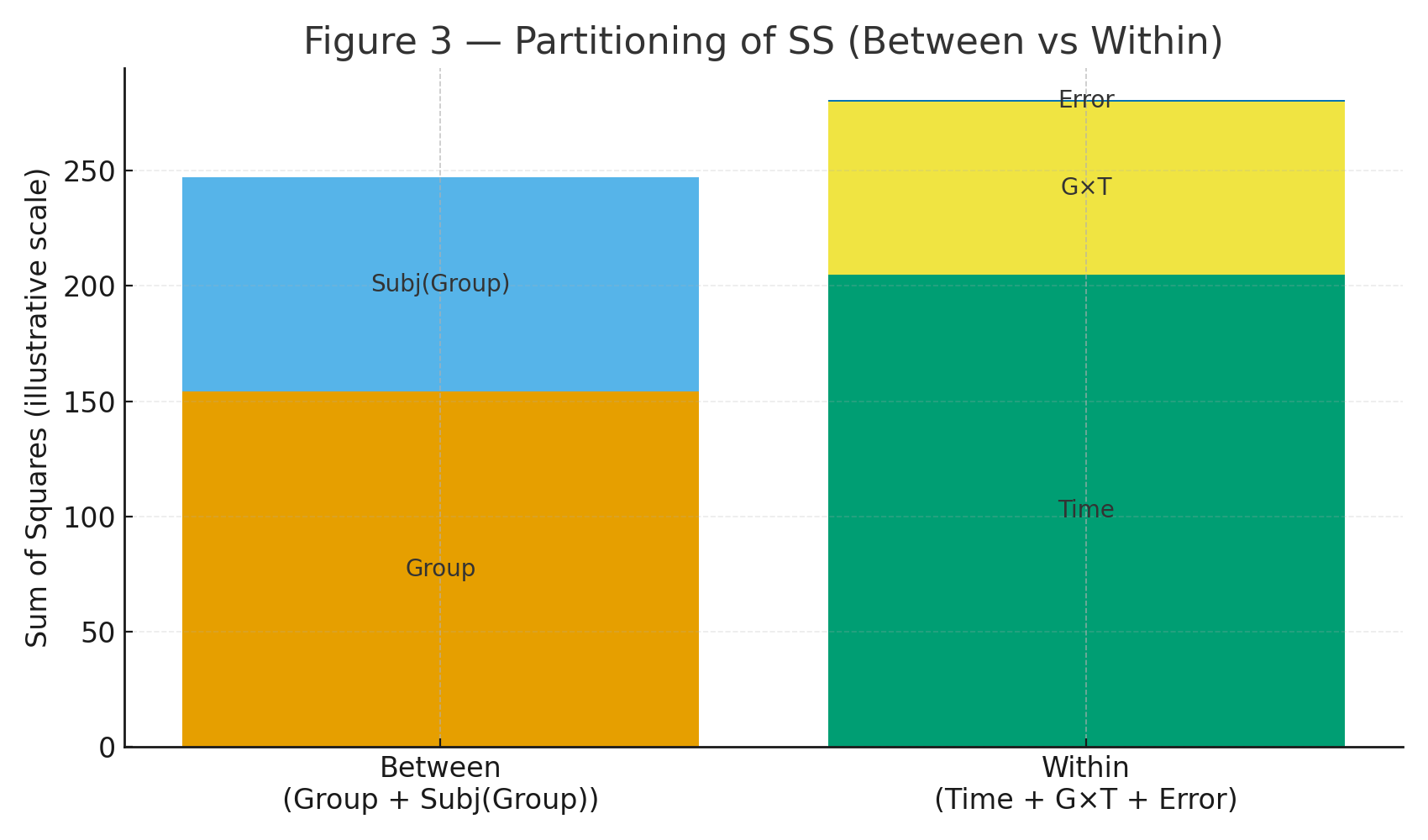
Let each subject’s mean be \(\bar X_{i\cdot}\). Then \[ SS_{\text{BS-total}}=k\sum_{i=1}^{16}(\bar X_{i\cdot}-\bar X)^2=\mathbf{247.2500}. \] Split into Group and Subjects-within-Group: \[ SS_{\text{Group}}=k\sum_{g} n_g(\bar X_{g\cdot\cdot}-\bar X)^2=\mathbf{154.0833}, \] \[ SS_{\text{Subj}(g)}=k\sum_{i\in g}(\bar X_{i\cdot}-\bar X_{g\cdot\cdot})^2=\mathbf{93.1667}. \]

2C. Within-Subjects

\(SS_{\text{WS-total}}=SS_{\text{total}}-SS_{\text{BS-total}}=\mathbf{280.6667}.\)

Decompose into Time, Group×Time, and residual Error: \[ SS_{\text{Time}}=s\sum_{t}(\bar X_{\cdot\cdot t}-\bar X)^2=\mathbf{205.0417}, \] \[ SS_{\text{Group}\times\text{Time}} =\sum_{g,t} n_g\Big(\bar X_{g\cdot t}-\bar X_{g\cdot\cdot}-\bar X_{\cdot\cdot t}+\bar X\Big)^2 =\mathbf{75.0417}, \] \[ SS_{\text{Error(WS)}}=SS_{\text{WS-total}}-SS_{\text{Time}}-SS_{\text{G}\times\text{T}} =\mathbf{0.5833}. \]

Figure 3: Partitioning diagram (Between: Group + Subj(Group); Within: Time + G×T + Error).


Step 3 — Degrees of Freedom (df) & Mean Squares (MS)

\[ \begin{aligned} &df_{\text{Group}}=g-1=1,\qquad df_{\text{Subj}(g)}=N_s-g=16-2=14,\\ &df_{\text{Time}}=k-1=2,\qquad df_{\text{G}\times\text{T}}=(g-1)(k-1)=2,\\ &df_{\text{Error(WS)}}=(N_s-g)(k-1)=(16-2)\times2=28,\\ &df_{\text{Total}}=Nk-1=48-1=47. \end{aligned} \]

\[ \begin{aligned} &MS_{\text{Group}}=\frac{SS_{\text{Group}}}{df_{\text{Group}}}= \frac{154.0833}{1}= \mathbf{154.0833},\qquad MS_{\text{Subj}(g)}=\frac{93.1667}{14}= \mathbf{6.6548},\\ &MS_{\text{Time}}=\frac{205.0417}{2}= \mathbf{102.5208},\qquad MS_{\text{G}\times\text{T}}=\frac{75.0417}{2}= \mathbf{37.5208},\\ &MS_{\text{Error(WS)}}=\frac{0.5833}{28}= \mathbf{0.02083}. \end{aligned} \]


Step 4 — F Tests & p-values

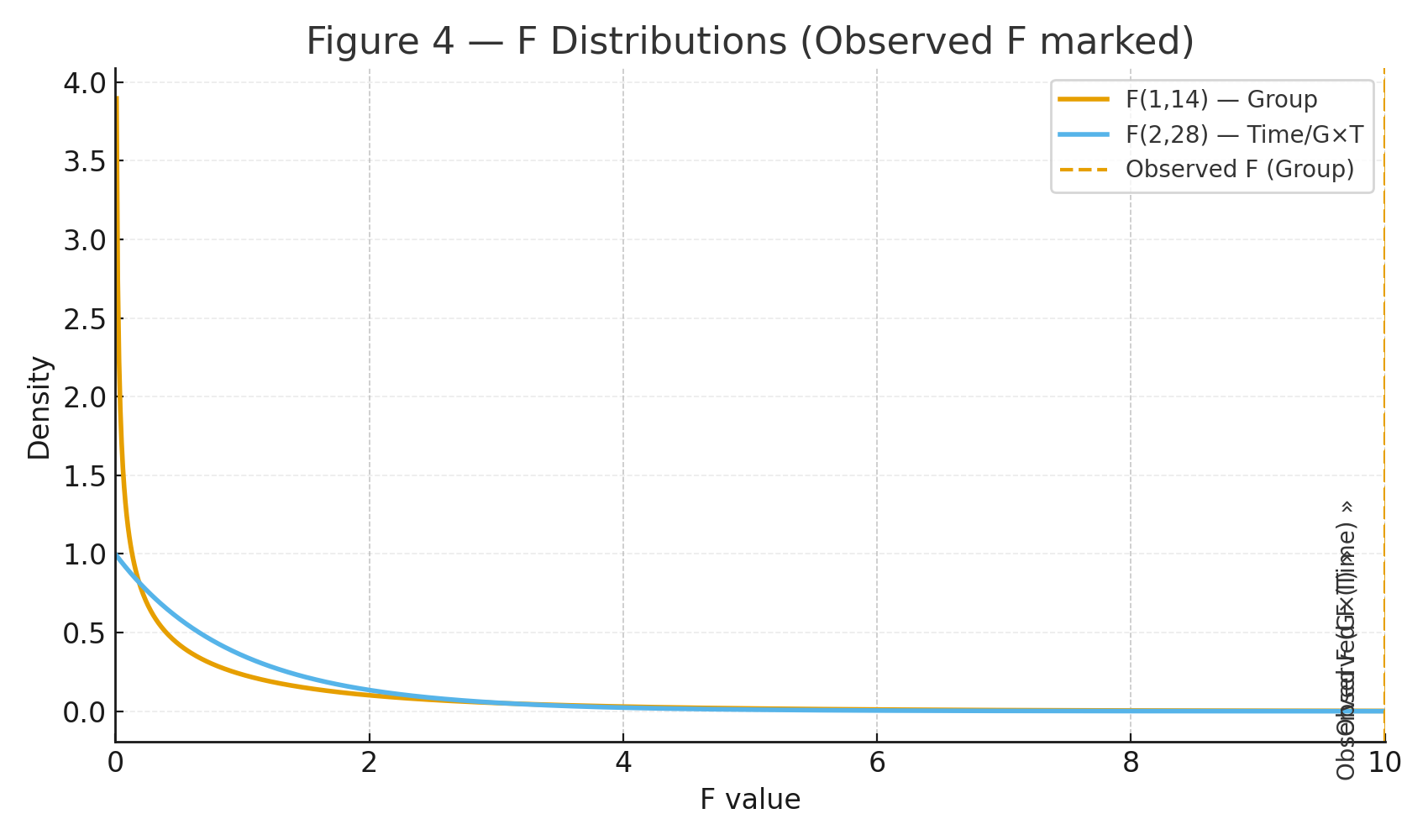
Between-subjects test: \[ F_{\text{Group}}=\frac{MS_{\text{Group}}}{MS_{\text{Subj}(g)}}=\frac{154.0833}{6.6548}= \mathbf{23.1538}, \quad df=(1,14),\quad p\approx \mathbf{0.00028}. \]

Within-subjects tests: \[ F_{\text{Time}}=\frac{MS_{\text{Time}}}{MS_{\text{Error(WS)}}} =\frac{102.5208}{0.02083}= \mathbf{4921.0},\quad df=(2,28),\quad p\ll 10^{-20}. \] \[ F_{\text{G}\times\text{T}}=\frac{MS_{\text{G}\times\text{T}}}{MS_{\text{Error(WS)}}} =\frac{37.5208}{0.02083}= \mathbf{1801.0},\quad df=(2,28),\quad p\ll 10^{-20}. \]

Figure 4: F distributions with observed statistics marked.


Mixed ANOVA Summary Table

SourceSSdfMSFp
Between: Group154.08331154.083323.15380.00028
Between: Subjects within Group93.1667146.6548
Within: Time205.04172102.52084921.0< 1e-20
Within: Group × Time75.0417237.52081801.0< 1e-20
Within: Error (Subj×Time within Group)0.5833280.02083
Total527.916747

Interpretation

Group: Drug > Placebo overall (significant between-subjects effect).
Time: Scores increase across weeks (strong within-subjects effect).
Group × Time: The Drug group improves sharply week-to-week while the Placebo group changes little (significant interaction).

Figure 5: Interaction plot showing non-parallel lines (Drug rising; Placebo flat).

Assumptions (checklist)

  • Independence between subjects; correct grouping.
  • Approximate normality within each Group×Time cell.
  • Homogeneity of variance across groups (between-subjects).
  • Sphericity for the within-subject factor Time (apply Greenhouse–Geisser/Huynh–Feldt corrections if violated).

Note: The residual within-subject error is intentionally small in this teaching dataset, so the Time and G×T F values are very large. Real data typically have larger residual variability.

Practice self-test quiz

In the space below, please find practice problems and self-test quizzes. For full access, please signup free.
One-Way ANOVA

anova boxplot
anova means sem
anova partition variance
anova f distribution

Goal. Test whether three teaching methods lead to different average exam scores.

Design & Experiment

Twenty-four students are randomly assigned to one of three methods (n = 8 per group):

  • Group A: Active discussion
  • Group B: Structured lecture
  • Group C: Self-study

After a 2-week module, everyone takes the same 100-point exam.


Data

Group AGroup BGroup C
727865
688270
758066
707768
697967
738169
718364
747671

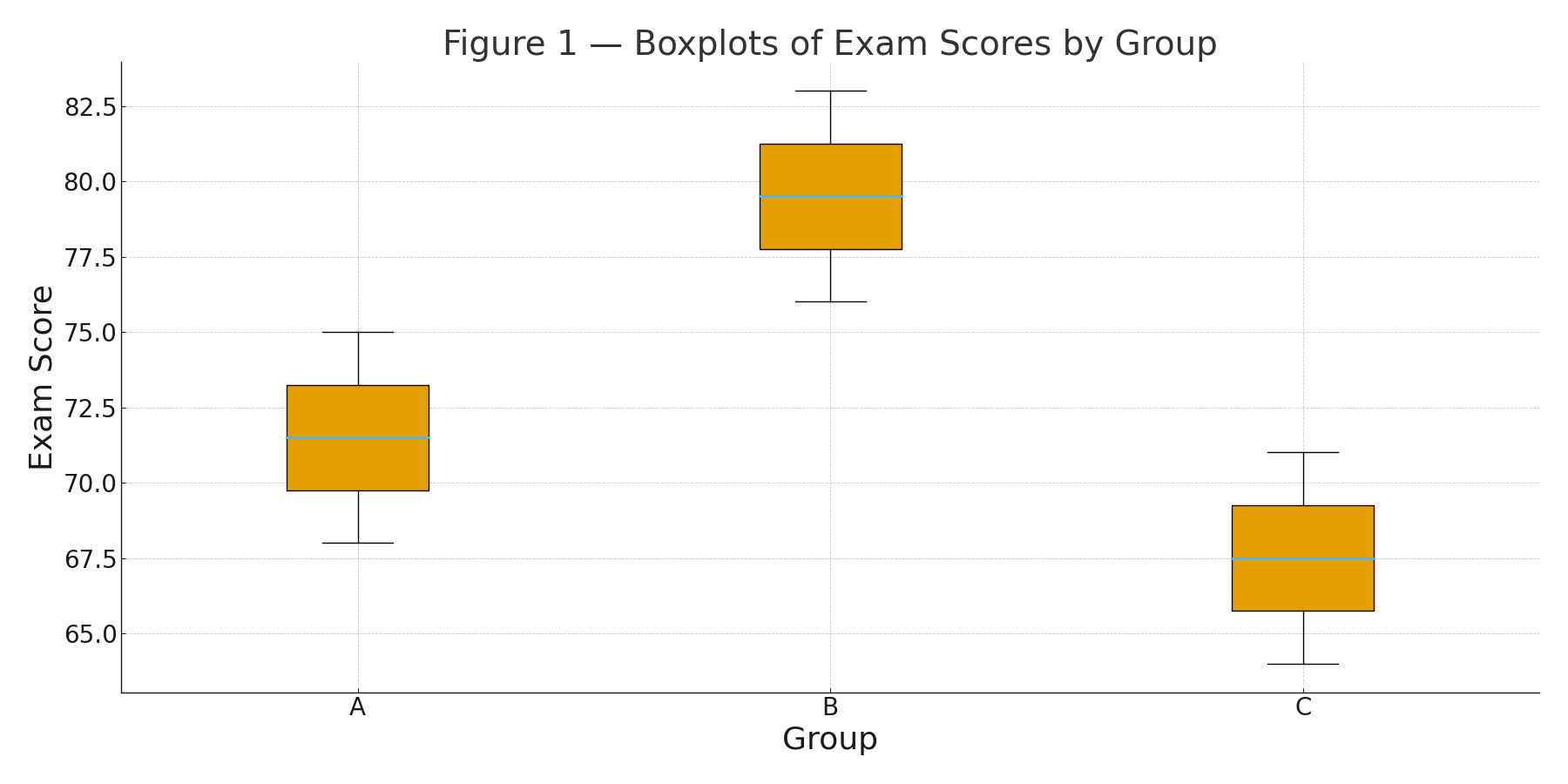
Figure 1: Boxplots of scores by group.

Group sizes: \(n_A=n_B=n_C=8\). Total \(N=24\).


Step 1 — Sums & Means

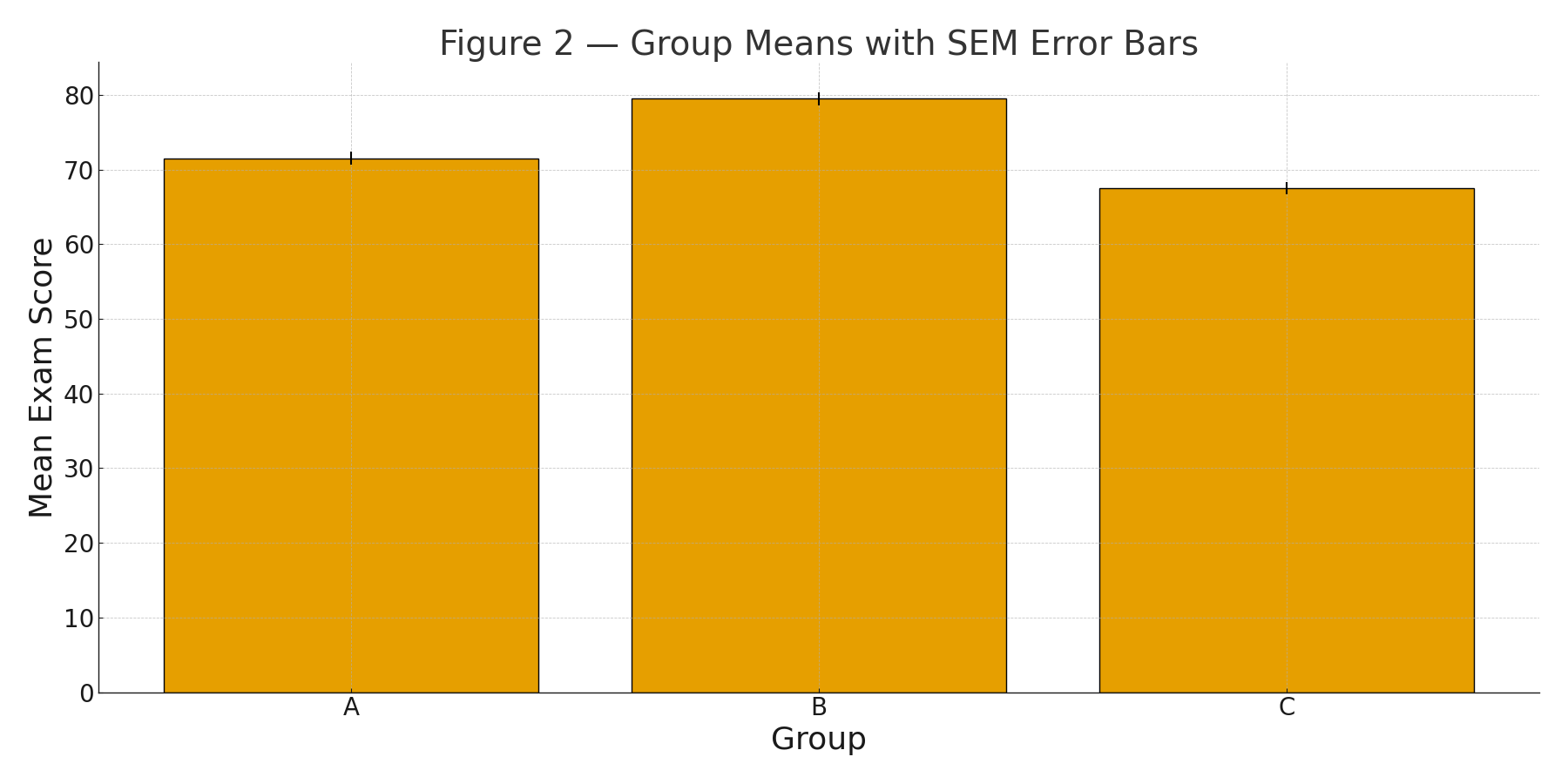
\(\displaystyle \begin{aligned} \text{Sums:}&\quad \sum A=572,\;\; \sum B=636,\;\; \sum C=540.\\[4pt] \text{Means:}&\quad \bar A=\tfrac{572}{8}=71.5,\;\; \bar B=\tfrac{636}{8}=79.5,\;\; \bar C=\tfrac{540}{8}=67.5.\\[4pt] \text{Grand mean:}&\quad \bar X=\tfrac{572+636+540}{24}=72.8333\ldots \end{aligned} \)


Step 2 — Within-Group Variability (sample variances)

For each group, compute \( s_g^2=\dfrac{\sum(x-\bar x_g)^2}{n_g-1} \).

  • \(s_A^2 = 6.0\)
  • \(s_B^2 = 6.0\)
  • \(s_C^2 = 6.0\)

Corresponding sums of squares within each group: \(\displaystyle SS_A=\sum(x-\bar A)^2=42,\; SS_B=42,\; SS_C=42\Rightarrow SS_{\text{within}}=42+42+42=126.0. \)

Figure 2: Group means with SEM error bars.


Step 3 — Between-Groups Variability

\(\displaystyle SS_{\text{between}}=\sum_{g} n_g(\bar x_g-\bar X)^2 =8(71.5-72.8333)^2+8(79.5-72.8333)^2+8(67.5-72.8333)^2 =597.3333\ldots \)

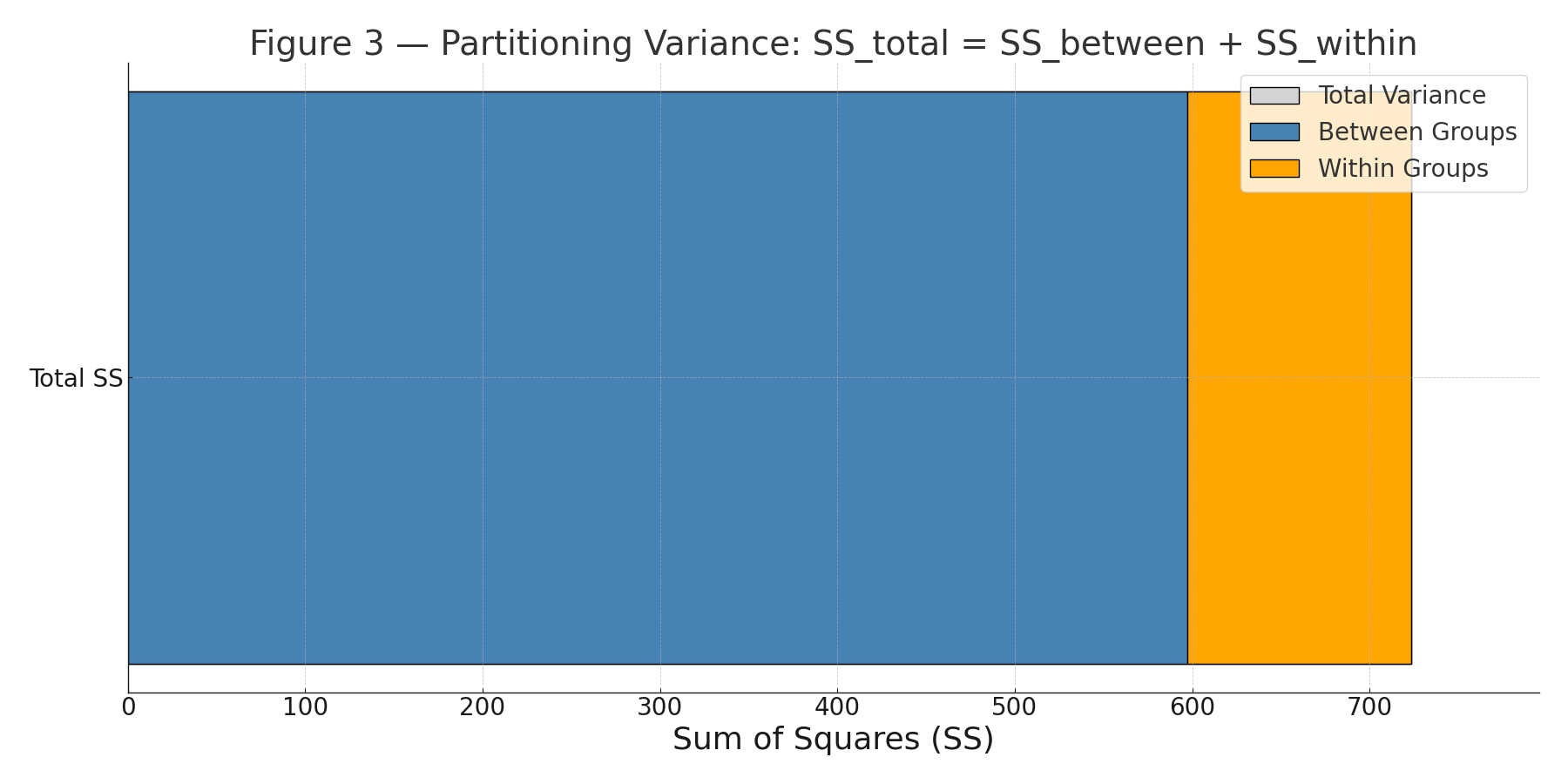
Total sum of squares: \(\displaystyle SS_{\text{total}}=\sum (x-\bar X)^2 = SS_{\text{between}}+SS_{\text{within}} =597.3333\ldots+126.0=723.3333\ldots \)

Figure 3: Partitioning variance (\(SS_{\text{total}}=SS_{\text{between}}+SS_{\text{within}}\)).


Degrees of Freedom & Mean Squares

\(\displaystyle df_{\text{between}}=k-1=3-1=2,\qquad df_{\text{within}}=N-k=24-3=21,\qquad df_{\text{total}}=N-1=23. \)

\(\displaystyle MS_{\text{between}}=\frac{SS_{\text{between}}}{df_{\text{between}}} =\frac{597.3333}{2}=298.6667,\qquad MS_{\text{within}}=\frac{SS_{\text{within}}}{df_{\text{within}}} =\frac{126.0}{21}=6.0. \)


Test Statistic & p-value

\(\displaystyle F=\frac{MS_{\text{between}}}{MS_{\text{within}}} =\frac{298.6667}{6.0}=49.7778. \)

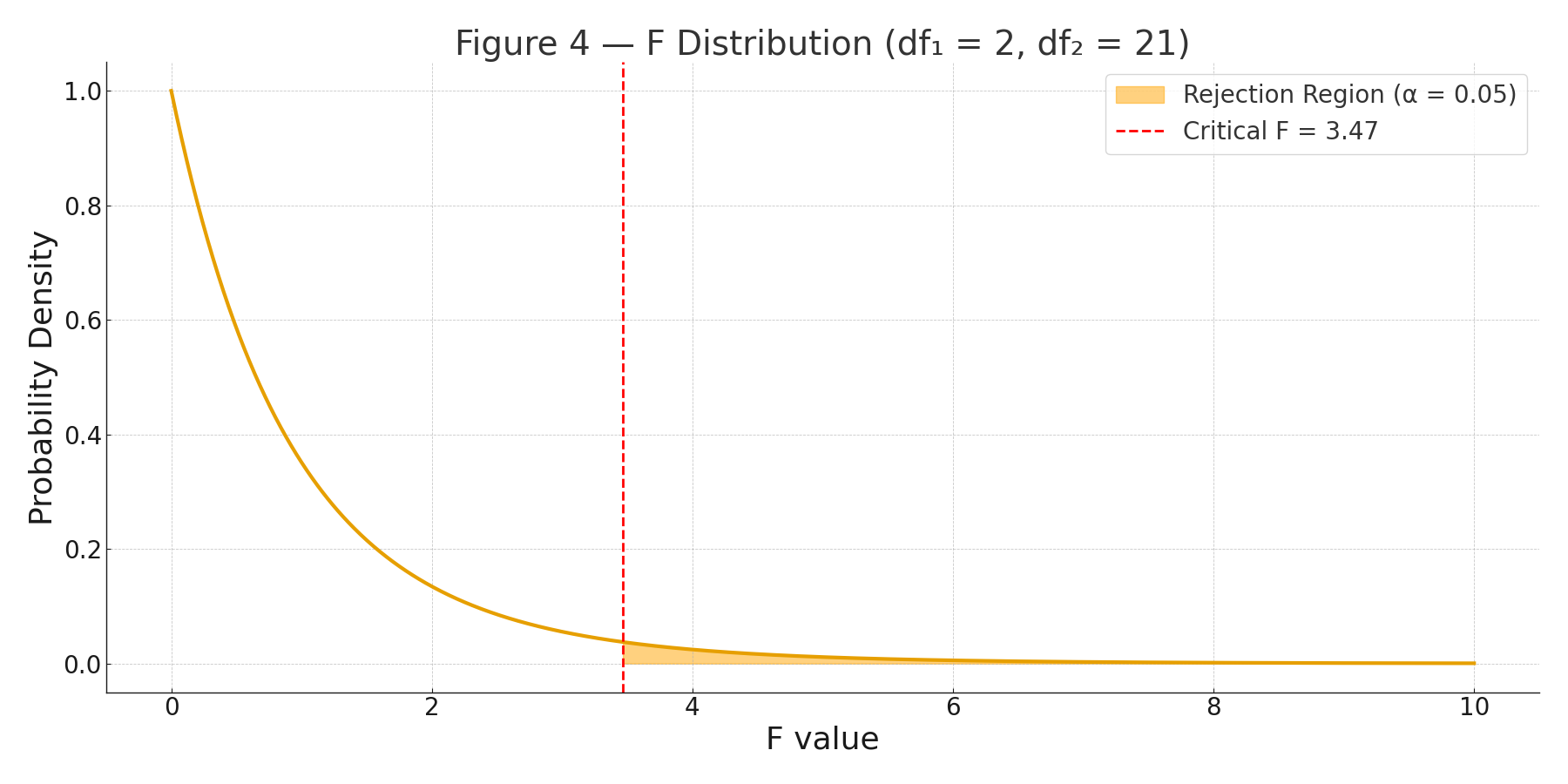
With \(df_1=2\), \(df_2=21\), the (right-tail) p-value is \(p\approx 1.07\times10^{-8}\) (i.e., \(p<0.00000002\)).

Figure 4: F distribution curve with right-tail decision region.


ANOVA Summary Table

SourceSSdfMSFp
Between groups597.33332298.666749.7778< 0.00000002
Within (error)126.0000216.0000
Total723.333323

Conclusion

There is a statistically significant difference among the three methods’ mean scores (\(F(2,21)=49.78,\; p\ll .001\)). A post-hoc comparison (e.g., Tukey HSD) would identify which pairs differ.

Assumptions (checklist)

  • Independent observations (via random assignment).
  • Approximately normal scores within each group.
  • Homogeneity of variance (here, each group variance \(\approx 6\)).

Practice self-test quiz

In the space below, please find practice problems and self-test quizzes. For full access, please signup free.
Appendix 8 — Glossary of Key Terms

Mean (average)
Sum of all scores divided by number of scores.
Example: (6 + 8 + 10) / 3 = 8.

Median
Middle score when data are ordered.
Example: For [5, 7, 8], median = 7.

Mode
Most frequent score.
Example: For [2, 3, 3, 5], mode = 3.

Variance (s²)
Average squared deviation from the mean.

Standard Deviation (s)
Square root of variance. Spread of scores around the mean.

Standard Error of the Mean (SEM)
How much sample means vary.
Formula: $$SEM = \frac{s}{\sqrt{n}}$$

t-test
Compares two means.

ANOVA (F-test)
Compares three or more means.

Post Hoc Test
Used after ANOVA to find which groups differ.

Correlation (r)
Strength and direction of a linear relationship. Range: –1 to +1.

Regression
Equation that predicts Y from X.
Example: $$\hat{Y} = a + bX$$

Chi-square (χ²)
Test for categorical data (counts).

Degrees of Freedom (df)
Independent pieces of information in a test.

p-value
Probability of getting the observed result (or more extreme) if the null hypothesis is true.


📱 QR: Interactive glossary (search symbols, formulas, definitions)

Practice self-test quiz

In the space below, please find practice problems and self-test quizzes. For full access, please signup free.
Appendix 7 — Study Tips for Statistics

Learning statistics is not about memorizing formulas — it’s about thinking with data.
Here are some strategies to make it easier.


1. Read Formulas in Two Ways

  • Symbolic: $$\bar{X} = \frac{\Sigma X}{n}$$
  • Words: “Mean = sum of scores / number of scores”

2. Practice by Hand First

  • Work out a mean or variance with a small dataset.
  • Then check with calculator/Excel.
  • This builds intuition and confidence.

3. Draw Pictures

  • Normal curve with shaded area
  • Bar charts for group means
  • Scatterplots for correlation
    Visuals make ideas stick.

4. Watch Out for Common Mistakes

  • Mixing up SD and SEM
  • Forgetting to subtract 1 for df
  • Using a one-tailed test when two-tailed is needed

5. Use Short Sessions

  • 10–15 minutes of practice each day beats one long cram.
  • Try one formula or test per session.

6. Check Your Understanding

  • Can you explain in words what the test does?
  • Example: “t-test compares two means. ANOVA compares three or more.”

📱 QR: Online flashcards + short quiz (practice key terms & formulas)


Practice self-test quiz

In the space below, please find practice problems and self-test quizzes. For full access, please signup free.

Appendix 6 — Data Sets for Practice

spreadsheet dataset

```html

Appendix 6 — Data Sets for Practice

Working with real numbers is the best way to learn statistics. This appendix provides small “mini datasets” you can analyze by hand (or with a calculator), plus larger files for practice with spreadsheets.


Dataset Provenance (Read This First)

  • Pedagogical = small, simplified numbers chosen to make learning and checking easier.
  • Simulated = computer-generated numbers designed to resemble real data (not collected from real people).
  • Empirical = collected from real observations (only used if explicitly stated).

Note: Unless a dataset is explicitly labeled Empirical, you should treat it as Pedagogical or Simulated practice data.


Mini Datasets (In-Page)

1) Quiz Scores

Provenance: Pedagogical
n: 10
Scale: Ratio (points)
Data: 6, 7, 8, 9, 10, 7, 8, 6, 9, 10

  • Suggested Lessons:
    • Lesson 2 — The Averages: mean, median, mode
    • Lesson 3 — Variance & Standard Deviation: variance, SD, z-scores
    • Lesson 4 — The Standard Normal Curve: interpret z-scores (as a bridge)
  • Check values (optional): Mean = 8.0; SD ≈ 1.41

2) Reaction Times (ms)

Provenance: Pedagogical (human-like values)
n: 8
Scale: Ratio (milliseconds)
Units: ms
Data: 220, 250, 270, 230, 260, 280, 240, 300

  • Suggested Lessons:
    • Lesson 3 — Variance & Standard Deviation: spread, outliers, SD
    • Lesson 6 — The t-test: use as a template dataset (e.g., compare two conditions by splitting into two groups)
    • Lesson 7 — ANOVA: extend to 3+ groups by creating conditions
  • Instructor tip: reaction time data often show mild skew in real life. If you want skew, see the larger practice files below.

3) Stress Reduction Scores (Three Groups)

Provenance: Pedagogical (grouped scores)
Scale: Interval/Ratio (score units; treat as interval for ANOVA practice)
Groups:

  • Meditation (n = 3): 65, 70, 72
  • Exercise (n = 3): 68, 71, 75
  • Music (n = 3): 75, 78, 82
  • Suggested Lessons:
    • Lesson 7 — ANOVA: one-way ANOVA (three independent groups)
    • Lesson 8 — Post Hoc Tests: follow-up comparisons after ANOVA (conceptual)
    • Lesson 13 — Degrees of Freedom Cookbook: df for one-way ANOVA
  • Important note: The sample sizes are intentionally small for learning mechanics. In real studies, groups are usually larger.

Larger Practice Datasets (Download Files)

These datasets are designed for spreadsheet work, graphing, and full problem sets.

  • Exam Scores (n = 100)
    Provenance: Simulated
    Suggested Lessons: Lesson 4 (normal curve), Lesson 5 (SEM), Lesson 6 (t-test foundations)
  • Survey Data (preferences by gender/age)
    Provenance: Simulated (categorical practice)
    Suggested Lessons: Lesson 12 (chi-square), Lesson 1 (why statistics matters in decisions)
  • Simulated Medical Trial (treatment vs. control, repeated measures)
    Provenance: Simulated (instructional “trial-style” dataset; not clinical research)
    Suggested Lessons: Lesson 6 (t-test concepts), Lesson 7 (variance partitioning concepts), and for advanced learners: repeated-measures ideas (optional)

Downloads: CSV and Excel files are provided via the QR code(s) on this page (and/or direct links, if enabled on your device).

Reproducibility note (simulated files): If you revise these datasets in future editions, consider generating them with a fixed random seed so instructors and students can reproduce results across versions.


Trusted External Sources (Optional)

If you want additional datasets beyond the practice files above, the following repositories are widely used for learning and benchmarking:

  • NIST Statistical Reference Datasets (SRD)
    High-quality benchmark datasets for practice and verification (excellent for checking calculations and software).
  • UCI Machine Learning Repository
    Larger, more complex datasets. Recommended only for advanced students or enrichment projects.

Visual Reference

Figure F.1 — Example spreadsheet view of a dataset (columns such as ID, Score, Group). Use this as a template for organizing your own data before running calculations.


Self-Test Quiz Access

Practice problems and self-test quizzes may appear below. If full access is restricted, please sign up (free) to unlock the quiz section.

```

Appendix 5 — Technology Tips (On Your Phone & Laptop)

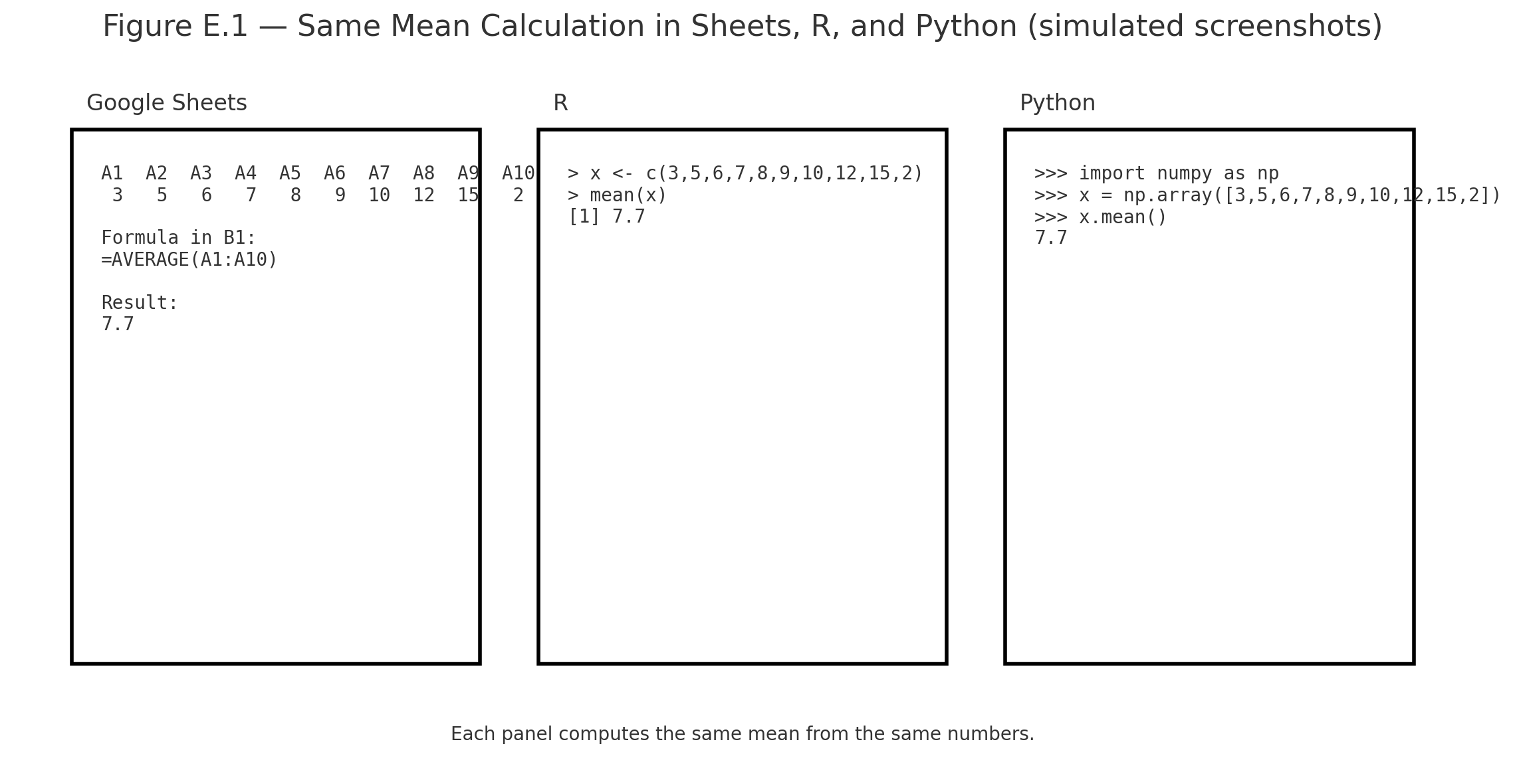
mean across tools

Statistics can be done with calculators, spreadsheets, or software. Here’s a quick guide.


Excel / Google Sheets

TaskFormulaExample
Mean=AVERAGE(A1:A10)Mean of scores in A1–A10
Standard Deviation=STDEV.S(A1:A10)Spread of scores
t-test=T.TEST(A1:A10,B1:B10,2,2)Compare two groups

R (RStudio or RStudio Cloud)

TaskCommandExample
Meanmean(x)mean(c(6,8,10)) = 8
SDsd(x)sd(c(6,8,10)) = 2
t-testt.test(x,y)Compare two groups

Python (NumPy / SciPy / Pandas)

TaskCommandExample
Meannp.mean(x)np.mean([6,8,10]) = 8
SDnp.std(x, ddof=1)np.std([6,8,10],ddof=1) = 2
t-teststats.ttest_ind(x,y)Compare two groups

iPhone Calculator

  • Rotate sideways → scientific mode
  • Use √ for square root
  • Parentheses matter: type numerator, then divide by denominator
  • Fine for small problems, but not for full datasets

Summary

  • For quick homework: iPhone calculator
  • For assignments: Excel / Google Sheets
  • For coding: Python (Colab) or R (RStudio Cloud)

📱 QR: Open sample data in Google Sheets (ready to practice mean, SD, t-test)


Visuals

Figure E.1 — Screenshots of the same mean calculation in Sheets, R, and Python side by side.

Practice self-test quiz

In the space below, please find practice problems and self-test quizzes. For full access, please signup free.
Appendix 4 — Using the z-table

Using the z-table
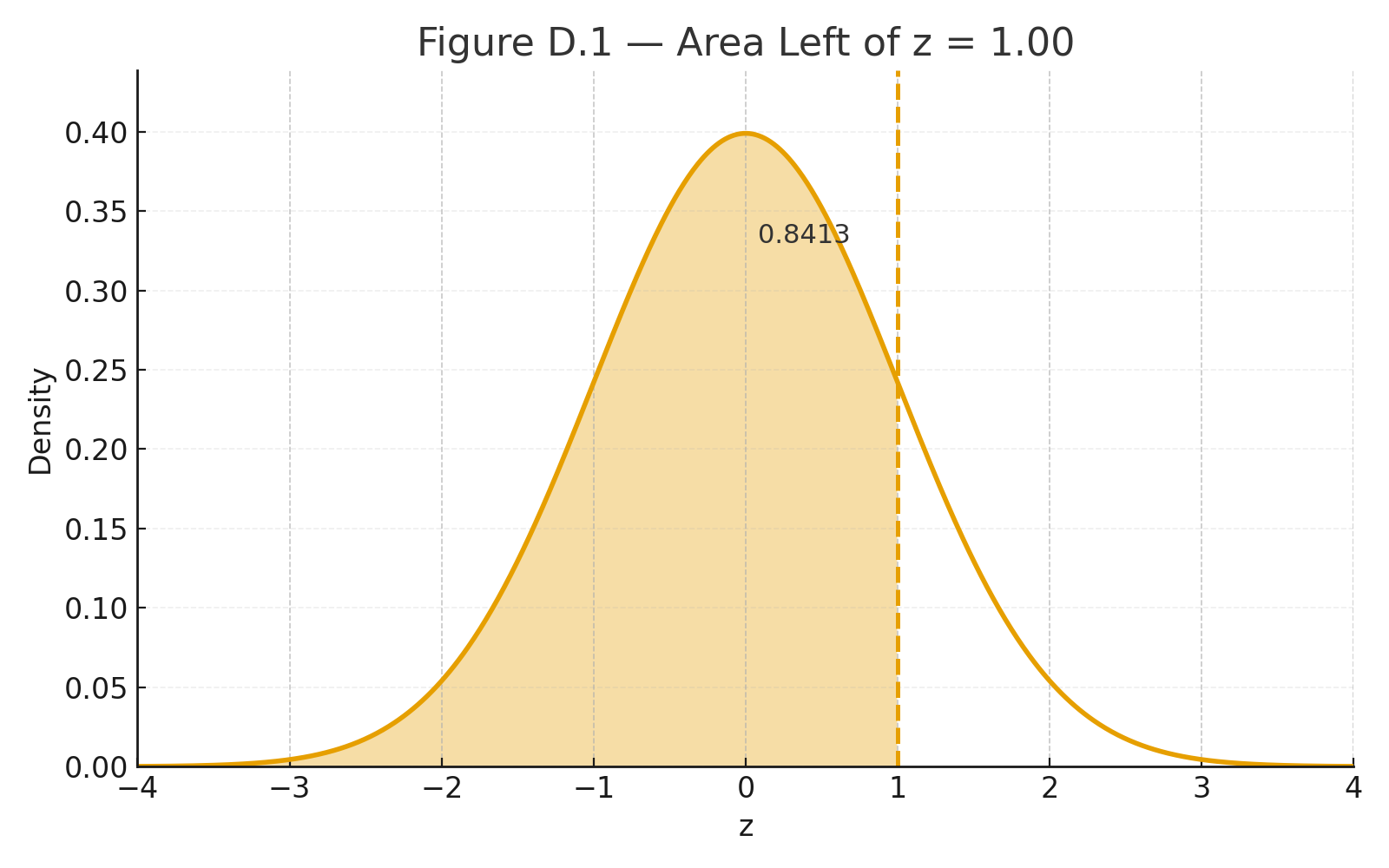
Area Left of z = 1.00
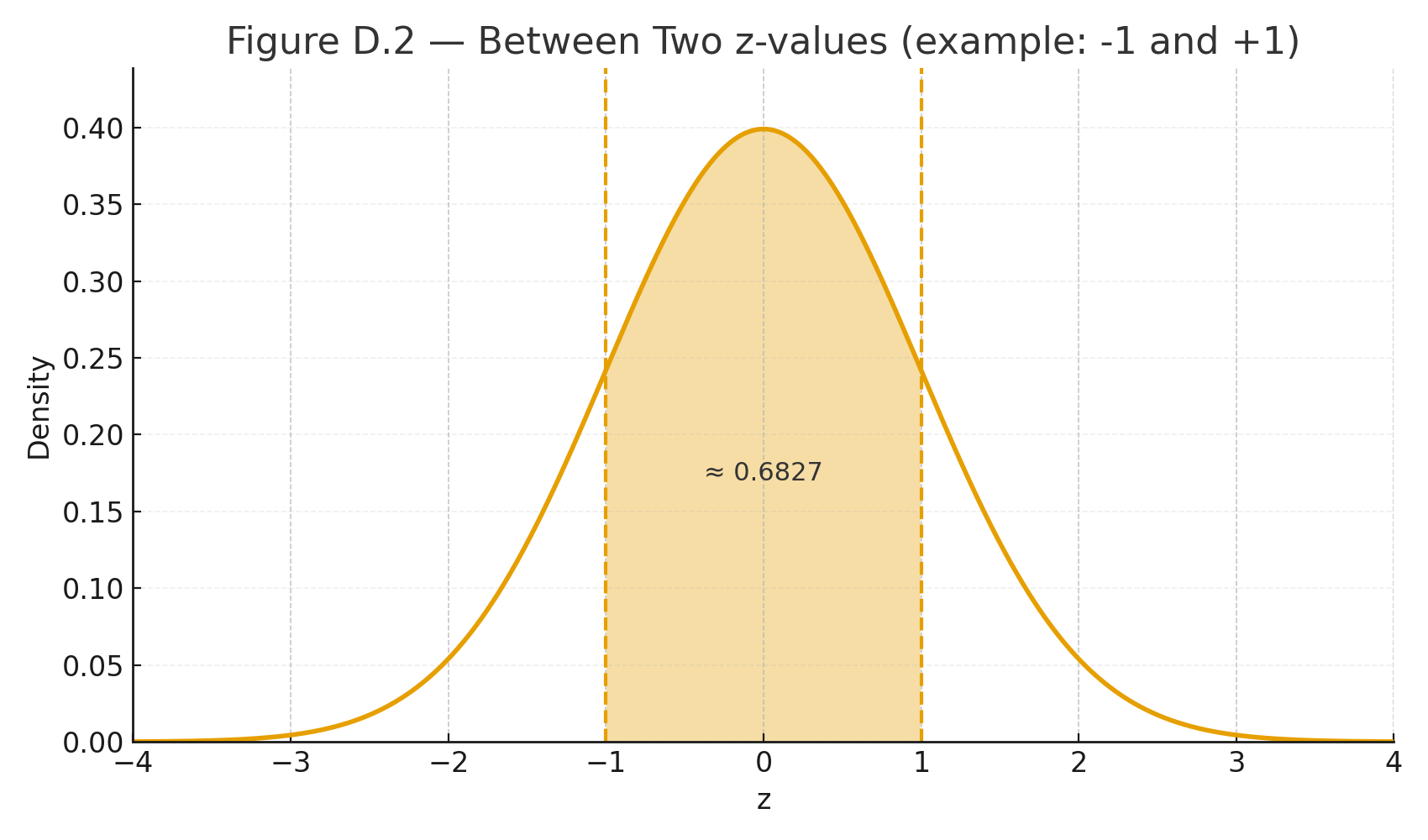
area Between Two z-values

The z-table gives areas (probabilities) under the standard normal curve (mean $$\mu=0$$, SD $$\sigma=1$$).
Use it after you standardize a score:

Standardization (z-score):
$$z=\frac{x-\mu}{\sigma}$$
In words: $$z=\frac{\text{score} - \text{mean}}{\text{standard deviation}}$$


What the z-table shows

Most tables list the area to the left of a z value (cumulative probability).

  • Left area at $$z=0$$ is 0.5000 (half the curve).
  • Far left (negative big z) approaches 0; far right (positive big z) approaches 1.

Quick recipes

1) Probability below a score (left tail)
Example: $$z=1.00$$ → table gives 0.8413.
Interpretation: $$P(Z \le 1.00)=0.8413$$ (84.13% below).

2) Probability above a score (right tail)
Use complement: $$P(Z \ge z)=1-\text{left area}$$.
Example: $$z=1.00 \Rightarrow P(Z \ge 1.00)=1-0.8413=0.1587.$$

3) Probability between two scores
Subtract left areas.
Example: between $$z= -0.50$$ (left area 0.3085) and $$z=1.20$$ (0.8849):
$$P(-0.50 \le Z \le 1.20)=0.8849-0.3085=0.5764.$$

4) From a raw score to probability
Test scores: $$\mu=100, \ \sigma=15$$. What % are below 115?
Standardize: $$z=\frac{115-100}{15}=1.00 \Rightarrow 0.8413 \ (\text{84.13%}).$$

5) From probability to raw score (percentile)
What score is the 90th percentile?
Find z with left area ≈ 0.9000 → $$z \approx 1.2816$$.
Convert back: $$x=\mu+z\sigma=100+(1.2816)(15)=119.22.$$


Tips

  • For negative z, use the table’s symmetry: left area at $$-z$$ equals 1 − left area at $$+z$$.
  • Rounding: two decimals is common (e.g., 1.23).
  • Modern tools (calculator/Sheets/Python) can give exact p-values directly.

Visuals

Figure D.1 — Normal curve with area left of z = 1.00 shaded (0.8413).
Figure D.2 — Two-z shaded band for “between” probability.


📱 QR: Online z-calculator (type z or x, get areas instantly)

Practice self-test quiz

In the space below, please find practice problems and self-test quizzes. For full access, please signup free.
Appendix 3 — Using the t-table and F-table

Online z-calculator (type z or x, get areas instantly)
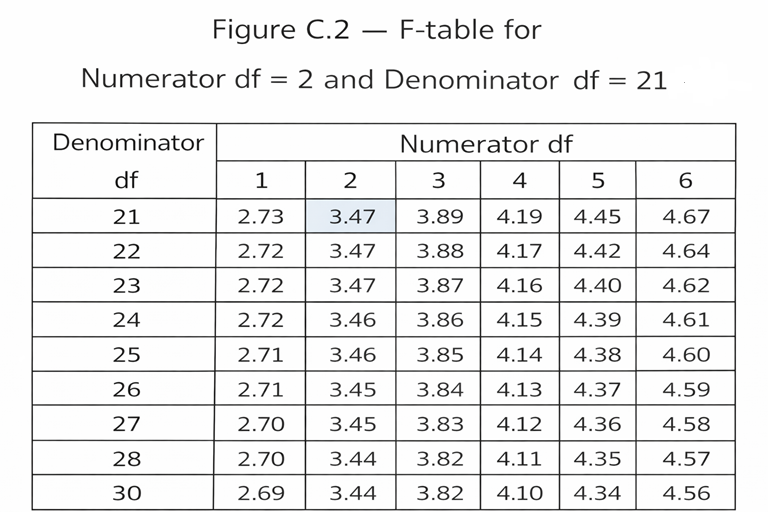
F2,21
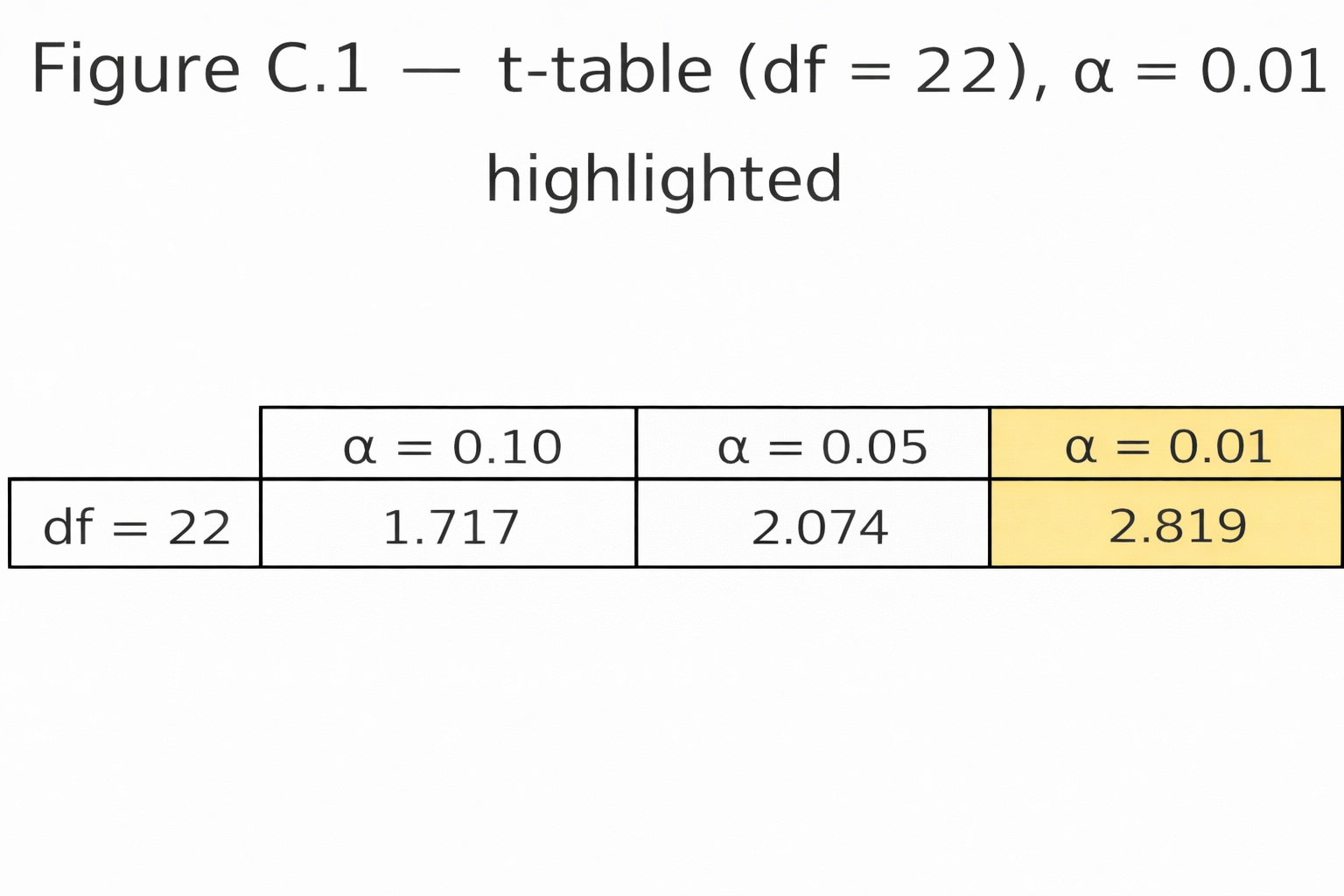
t-df22,0.01

Tables give the critical values we compare our test statistic against.
They depend on:

  • The significance level (α, often 0.05)
  • The degrees of freedom (df)

t-table

  • Rows = degrees of freedom (df)
  • Columns = significance level (α)

Example:

  • Independent-samples t-test with n₁ = 12, n₂ = 12
  • df = 12 + 12 – 2 = 22
  • At α = 0.05 (two-tailed) → critical t ≈ 2.07
  • If $$|t| \geq 2.07$$ → significant

F-table

  • Needs two df values:
    • df between (numerator)
    • df within (denominator)

Example:

  • One-way ANOVA, 3 groups, N = 24
  • df between = k – 1 = 2
  • df within = N – k = 21
  • At α = 0.05 → critical F ≈ 3.47
  • If computed F ≥ 3.47 → significant

Student Tips

  • Always compute df correctly.
  • Use tables if no software is available.
  • Most calculators or apps today give exact p-values — faster than tables.

📱 QR: Interactive critical value calculator (t and F tables online)


Visuals

Figure C.1 — Snippet of a t-table row (df = 22, α = 0.05 highlighted).
Figure C.2 — F-table grid with numerator df = 2, denominator df = 21 marked.


Practice self-test quiz

In the space below, please find practice problems and self-test quizzes. For full access, please signup free.
Appendix 2 — Math Review for Statistics

Algebra refresher video (scan for a quick math warm-up)

A quick refresher on the math you’ll need in this book.


Order of Operations (PEMDAS)

  • Parentheses → Exponents → Multiplication/Division → Addition/Subtraction
  • Example:
    $$3 + 2 \times (4^2) = 3 + 2 \times 16 = 35$$

Fractions and Division

  • Example:
    $$\frac{24}{6} = 4$$

Square Roots

  • Example:
    $$\sqrt{9} = 3$$
  • Example:
    $$\sqrt{\frac{16}{4}} = \sqrt{4} = 2$$

Summation Notation (Σ)

  • Means “add them up.”
  • Example:
    $$\Sigma X = 2+5+7 = 14$$
  • Example:
    $$\Sigma (X-\bar{X})^2 = (2-4)^2 + (5-4)^2 + (7-4)^2 = 4+1+9 = 14$$

Exponents and Squares

  • $$x^2 = x \times x$$
  • Example:
    $$5^2 = 25$$

Mini Example: Variance and Standard Deviation

Data: 6, 8, 10

  1. Mean:
    $$\bar{X} = \frac{6+8+10}{3} = 8$$
  2. Deviations: –2, 0, +2
  3. Squared deviations: 4, 0, 4
  4. Variance:
    $$\frac{8}{2} = 4$$
  5. Standard deviation:
    $$\sqrt{4} = 2$$

📱 QR: Algebra refresher video (scan for a quick math warm-up)

Practice self-test quiz

In the space below, please find practice problems and self-test quizzes. For full access, please signup free.
Appendix 1 — Symbols and Notation (Cheat Sheet)

Symbols and Notation

A quick reference to the symbols used in this book.

SymbolMeaningExample
$$\Sigma$$Summation (add them up)$$\Sigma X = 2+4+6=12$$
$$\bar{X}$$Sample mean$$\bar{X} = \tfrac{12}{3} = 4$$
$$\mu$$Population mean“The true average of all scores”
$$s$$Sample standard deviationSpread of quiz scores
$$\sigma$$Population standard deviationSpread of SAT scores
$$df$$Degrees of freedom$$df = n-1 = 29$$ if $$n=30$$
$$t$$t-test statisticCompare two group means
$$F$$ANOVA statisticCompare 3+ group means
$$r$$Pearson correlationStrength of linear relationship
$$R^2$$Coefficient of determinationProportion of variance explained
$$\chi^2$$Chi-square statisticCompare observed vs. expected counts
$$p$$Probability value“p < 0.05” → significant result

Practice self-test quiz

In the space below, please find practice problems and self-test quizzes. For full access, please signup free.