Statistics 2nd ed

mean

Appendix 8 — Glossary of Key Terms

Mean (average)
Sum of all scores divided by number of scores.
Example: (6 + 8 + 10) / 3 = 8.

Median
Middle score when data are ordered.
Example: For [5, 7, 8], median = 7.

Mode
Most frequent score.
Example: For [2, 3, 3, 5], mode = 3.

Variance (s²)
Average squared deviation from the mean.

Standard Deviation (s)
Square root of variance. Spread of scores around the mean.

Standard Error of the Mean (SEM)
How much sample means vary.
Formula: $$SEM = \frac{s}{\sqrt{n}}$$

t-test
Compares two means.

ANOVA (F-test)
Compares three or more means.

Post Hoc Test
Used after ANOVA to find which groups differ.

Correlation (r)
Strength and direction of a linear relationship. Range: –1 to +1.

Regression
Equation that predicts Y from X.
Example: $$\hat{Y} = a + bX$$

Chi-square (χ²)
Test for categorical data (counts).

Degrees of Freedom (df)
Independent pieces of information in a test.

p-value
Probability of getting the observed result (or more extreme) if the null hypothesis is true.


📱 QR: Interactive glossary (search symbols, formulas, definitions)

Practice self-test quiz

In the space below, please find practice problems and self-test quizzes. For full access, please signup free.
Appendix 5 — Technology Tips (On Your Phone & Laptop)

mean across tools

Statistics can be done with calculators, spreadsheets, or software. Here’s a quick guide.


Excel / Google Sheets

TaskFormulaExample
Mean=AVERAGE(A1:A10)Mean of scores in A1–A10
Standard Deviation=STDEV.S(A1:A10)Spread of scores
t-test=T.TEST(A1:A10,B1:B10,2,2)Compare two groups

R (RStudio or RStudio Cloud)

TaskCommandExample
Meanmean(x)mean(c(6,8,10)) = 8
SDsd(x)sd(c(6,8,10)) = 2
t-testt.test(x,y)Compare two groups

Python (NumPy / SciPy / Pandas)

TaskCommandExample
Meannp.mean(x)np.mean([6,8,10]) = 8
SDnp.std(x, ddof=1)np.std([6,8,10],ddof=1) = 2
t-teststats.ttest_ind(x,y)Compare two groups

iPhone Calculator

  • Rotate sideways → scientific mode
  • Use √ for square root
  • Parentheses matter: type numerator, then divide by denominator
  • Fine for small problems, but not for full datasets

Summary

  • For quick homework: iPhone calculator
  • For assignments: Excel / Google Sheets
  • For coding: Python (Colab) or R (RStudio Cloud)

📱 QR: Open sample data in Google Sheets (ready to practice mean, SD, t-test)


Visuals

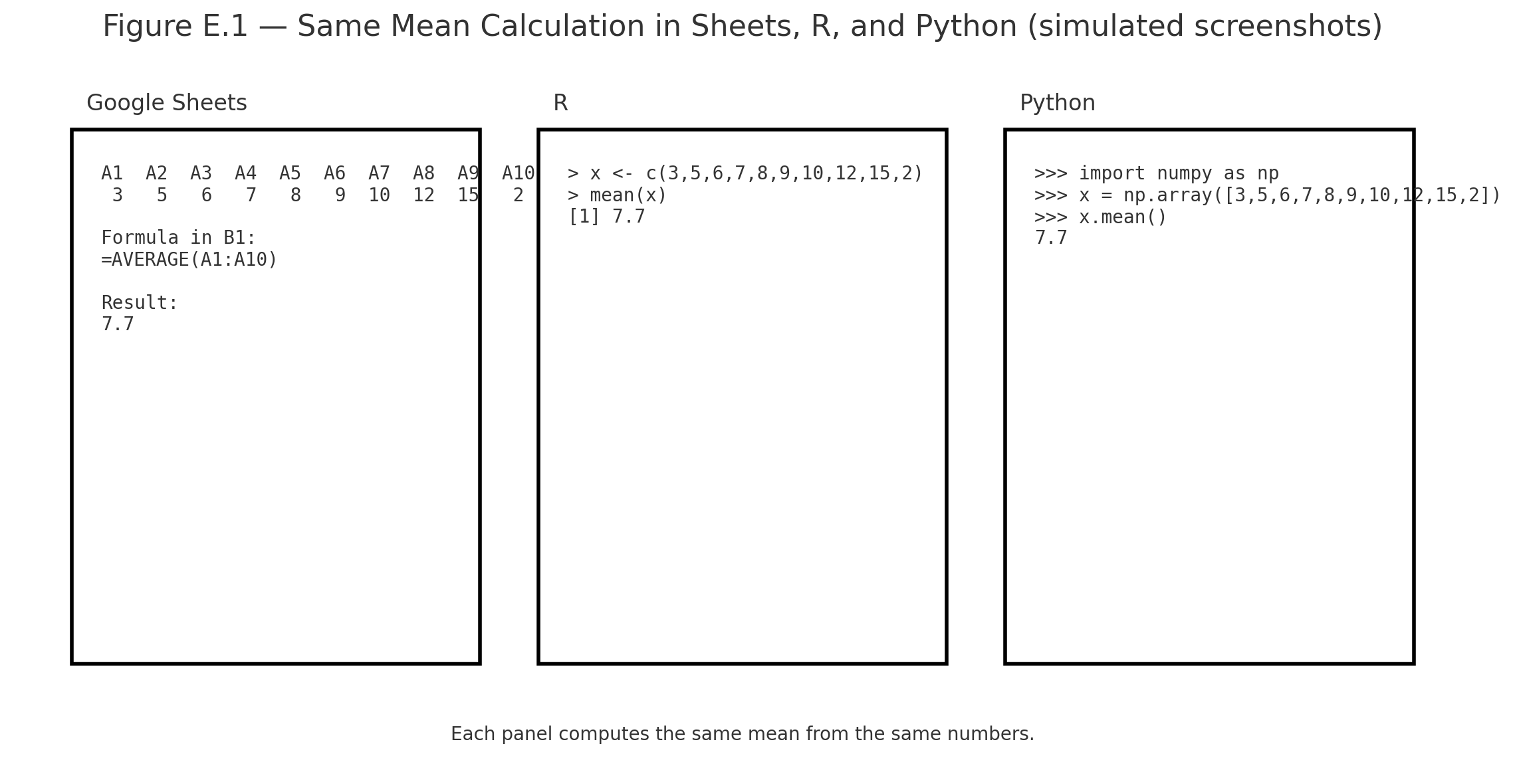
Figure E.1 — Screenshots of the same mean calculation in Sheets, R, and Python side by side.

Practice self-test quiz

In the space below, please find practice problems and self-test quizzes. For full access, please signup free.
Appendix 4 — Using the z-table

Using the z-table
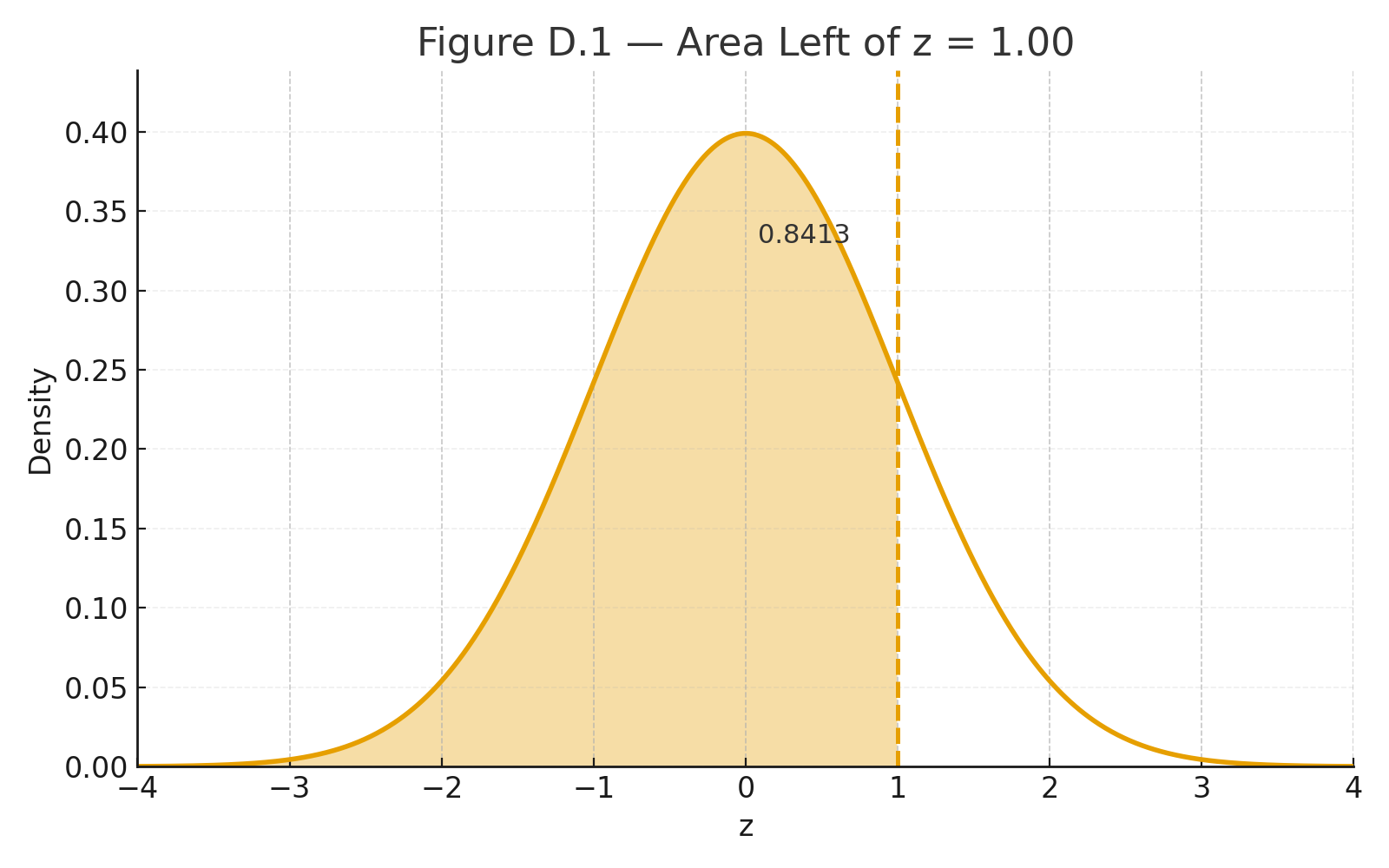
Area Left of z = 1.00
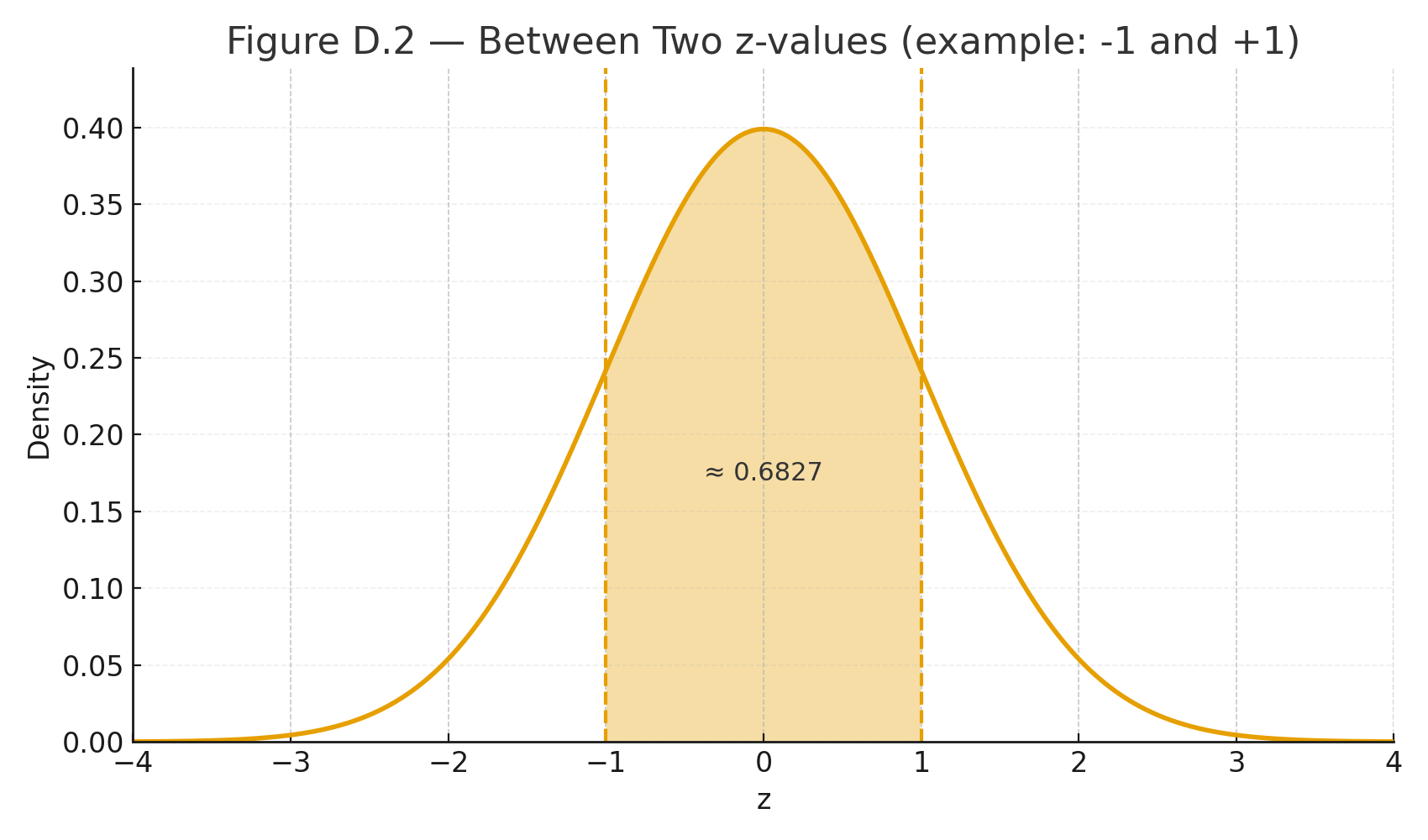
area Between Two z-values

The z-table gives areas (probabilities) under the standard normal curve (mean $$\mu=0$$, SD $$\sigma=1$$).
Use it after you standardize a score:

Standardization (z-score):
$$z=\frac{x-\mu}{\sigma}$$
In words: $$z=\frac{\text{score} - \text{mean}}{\text{standard deviation}}$$


What the z-table shows

Most tables list the area to the left of a z value (cumulative probability).

  • Left area at $$z=0$$ is 0.5000 (half the curve).
  • Far left (negative big z) approaches 0; far right (positive big z) approaches 1.

Quick recipes

1) Probability below a score (left tail)
Example: $$z=1.00$$ → table gives 0.8413.
Interpretation: $$P(Z \le 1.00)=0.8413$$ (84.13% below).

2) Probability above a score (right tail)
Use complement: $$P(Z \ge z)=1-\text{left area}$$.
Example: $$z=1.00 \Rightarrow P(Z \ge 1.00)=1-0.8413=0.1587.$$

3) Probability between two scores
Subtract left areas.
Example: between $$z= -0.50$$ (left area 0.3085) and $$z=1.20$$ (0.8849):
$$P(-0.50 \le Z \le 1.20)=0.8849-0.3085=0.5764.$$

4) From a raw score to probability
Test scores: $$\mu=100, \ \sigma=15$$. What % are below 115?
Standardize: $$z=\frac{115-100}{15}=1.00 \Rightarrow 0.8413 \ (\text{84.13%}).$$

5) From probability to raw score (percentile)
What score is the 90th percentile?
Find z with left area ≈ 0.9000 → $$z \approx 1.2816$$.
Convert back: $$x=\mu+z\sigma=100+(1.2816)(15)=119.22.$$


Tips

  • For negative z, use the table’s symmetry: left area at $$-z$$ equals 1 − left area at $$+z$$.
  • Rounding: two decimals is common (e.g., 1.23).
  • Modern tools (calculator/Sheets/Python) can give exact p-values directly.

Visuals

Figure D.1 — Normal curve with area left of z = 1.00 shaded (0.8413).
Figure D.2 — Two-z shaded band for “between” probability.


📱 QR: Online z-calculator (type z or x, get areas instantly)

Practice self-test quiz

In the space below, please find practice problems and self-test quizzes. For full access, please signup free.
Appendix 2 — Math Review for Statistics

Algebra refresher video (scan for a quick math warm-up)

A quick refresher on the math you’ll need in this book.


Order of Operations (PEMDAS)

  • Parentheses → Exponents → Multiplication/Division → Addition/Subtraction
  • Example:
    $$3 + 2 \times (4^2) = 3 + 2 \times 16 = 35$$

Fractions and Division

  • Example:
    $$\frac{24}{6} = 4$$

Square Roots

  • Example:
    $$\sqrt{9} = 3$$
  • Example:
    $$\sqrt{\frac{16}{4}} = \sqrt{4} = 2$$

Summation Notation (Σ)

  • Means “add them up.”
  • Example:
    $$\Sigma X = 2+5+7 = 14$$
  • Example:
    $$\Sigma (X-\bar{X})^2 = (2-4)^2 + (5-4)^2 + (7-4)^2 = 4+1+9 = 14$$

Exponents and Squares

  • $$x^2 = x \times x$$
  • Example:
    $$5^2 = 25$$

Mini Example: Variance and Standard Deviation

Data: 6, 8, 10

  1. Mean:
    $$\bar{X} = \frac{6+8+10}{3} = 8$$
  2. Deviations: –2, 0, +2
  3. Squared deviations: 4, 0, 4
  4. Variance:
    $$\frac{8}{2} = 4$$
  5. Standard deviation:
    $$\sqrt{4} = 2$$

📱 QR: Algebra refresher video (scan for a quick math warm-up)

Practice self-test quiz

In the space below, please find practice problems and self-test quizzes. For full access, please signup free.

Appendix 1 — Symbols and Notation (Cheat Sheet)

Symbols and Notation

A quick reference to the symbols used in this book.

SymbolMeaningExample
$$\Sigma$$Summation (add them up)$$\Sigma X = 2+4+6=12$$
$$\bar{X}$$Sample mean$$\bar{X} = \tfrac{12}{3} = 4$$
$$\mu$$Population mean“The true average of all scores”
$$s$$Sample standard deviationSpread of quiz scores
$$\sigma$$Population standard deviationSpread of SAT scores
$$df$$Degrees of freedom$$df = n-1 = 29$$ if $$n=30$$
$$t$$t-test statisticCompare two group means
$$F$$ANOVA statisticCompare 3+ group means
$$r$$Pearson correlationStrength of linear relationship
$$R^2$$Coefficient of determinationProportion of variance explained
$$\chi^2$$Chi-square statisticCompare observed vs. expected counts
$$p$$Probability value“p < 0.05” → significant result

Practice self-test quiz

In the space below, please find practice problems and self-test quizzes. For full access, please signup free.
Lesson 2 — The Averages

mean mode median

When we look at a set of numbers, the first question is: What is the typical value?
Statistics gives us three common answers — the mean, the median, and the mode.

Each describes “typical” in a different way.


The Mean

The mean is the arithmetic average — the balance point of the data.

Symbolic formula:
$$\bar{X} = \frac{\sum X}{n}$$

Formula in words:
$$\text{Mean} = \frac{\text{sum of scores}}{\text{number of scores}}$$

Where:

  • $$\bar{X}$$ = mean (X bar)
  • $$\sum X$$ = sum of all scores
  • $$n$$ = number of scores

Example: Scores: 10, 8, 7

$$\bar{X} = \frac{10 + 8 + 7}{3} = \frac{25}{3} = 8.33$$

So the mean is about 8.3.


The Median

The median is the middle value when the numbers are placed in order.

Steps:

  1. Arrange the scores from smallest to largest.
  2. If there are an odd number of scores, the median is the middle one.
  3. If there are an even number of scores, the median is the average of the two middle ones.

Examples:

  • Data: 5, 7, 9 → Median = 7
  • Data: 4, 6, 10, 12 → Median = (6 + 10)/2 = 8

The Mode

The mode is the most frequent score.

Example: Data: 2, 2, 4, 5, 5, 5, 7 → Mode = 5


Definition

  • Mean: arithmetic average; balance point.
  • Median: middle score; divides data in half.
  • Mode: most frequent score.

Visuals

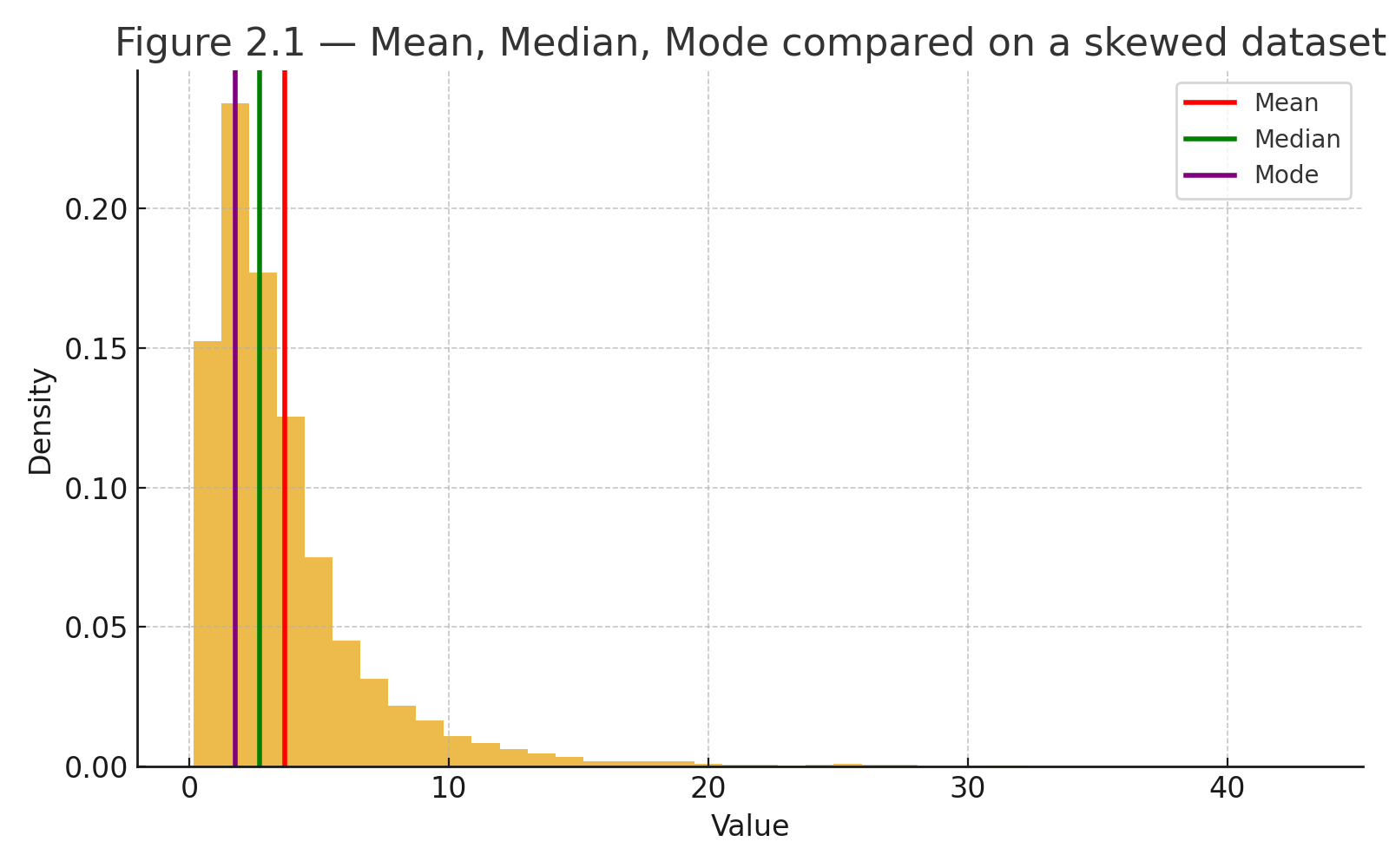
Figure 2.1 — Mean, Median, Mode compared on a skewed dataset. Histogram with three markers: red line = mean, green line = median, purple line = mode.


Why These Matter

  • The mean is sensitive to extreme values.
  • The median resists extremes and can better represent a “typical” score.
  • The mode is useful for categorical or count data.

Together, the three averages give us a rounded view of what is typical in a dataset.

Practice self-test quiz

In the space below, please find practice problems and self-test quizzes. For full access, please signup free.